Development of an Intelligent Video Surveillance System Based on YOLO Algorithm
The question
How can a camera system recognise and report events in an office?
Office cameras record throughout the day, making it impractical to watch every stream. Although a modern detector can locate people in individual frames, recognising that a server room is occupied or someone has entered a closed laboratory requires following their movement across frames. That processing must also keep pace with live video on ordinary hardware. We built a web-based office system that connects detection and tracking to those events, with face recognition and alerts as additional functions.
What we built
The system reads IP-camera streams, detects people with YOLOv8-nano, tracks them, and checks their positions against areas and lines that users draw. In a Django web application, users add cameras, choose modules, and set triggers, recipients, and alert intervals. Events are logged and sent to Telegram. The office demonstrations ran on a consumer graphics card.
Schematic overview
Turning detected people into a configured event and notification
Locate people in each frame
Read frames from an IP camera and use YOLOv8-nano to draw boxes around detected people. A box says where a person is, not who they are.
Apply an area or crossing rule
Track detected people across frames. Check whether their positions occupy a selected area or move across a configured line; those rules produce different events.
Notify the user about that event
The user selects the module, trigger, recipient, and notification interval. The web application connects camera processing and stored events with the Telegram notification path.
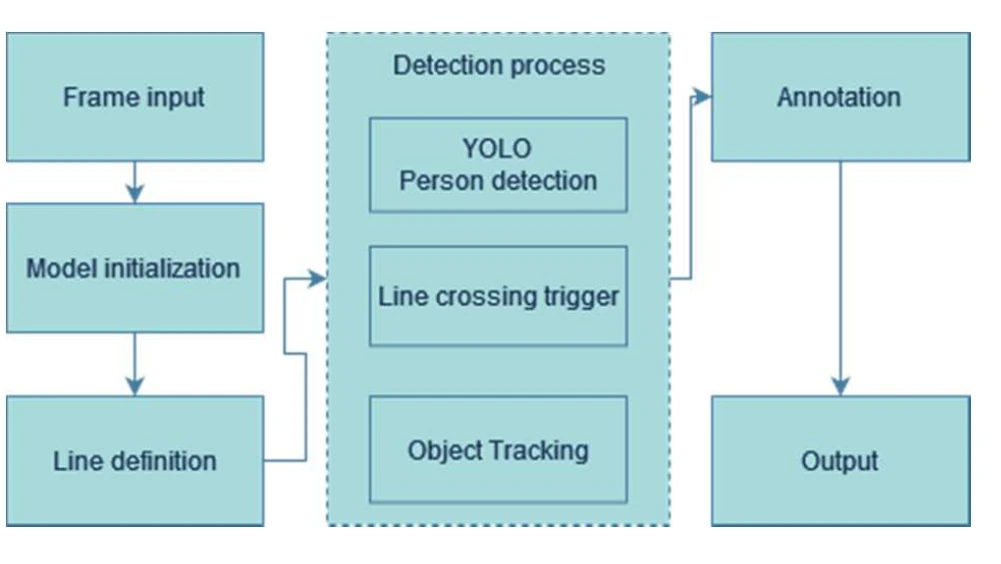
How the line-crossing module is organised
The original diagram combines camera frames with a user-defined line. Person detection and object tracking supply positions; the crossing rule turns those positions into an annotated output.
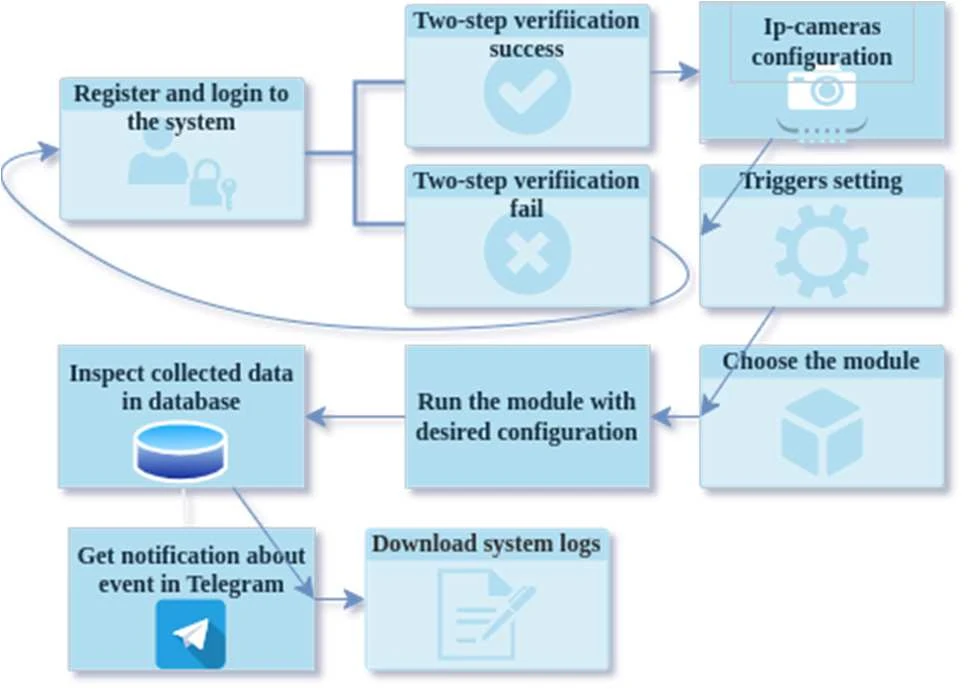
How a user configures the complete system
Camera and trigger setup lead to choosing and running a module. Its output can be inspected in the database or sent as a Telegram notification.
Figure details and test conditions
The reported office tests used a GTX 1660 SUPER GPU and a 504 × 706 RGB video stream. The paper illustrates occupancy, crossing, and face-recognition modules. Its detector-selection table reports speed, latency, and COCO object-detection scores; these are different from testing the full office event-and-notification pipeline.
Following people across video frames
Detection benchmarks score boxes in single images, but an office event depends on many frames in a row. When one person briefly hides another, the detector’s confidence drops, and trackers that discard such detections lose people and break their trajectories. At a doorway, a broken trajectory can count one person twice or miss the crossing. Image quality matters too: on a benchmark of corrupted images, standard detectors fell to 30–60% of their original performance.
All of this has to run continuously, for every camera, on whatever hardware an office has. We therefore weighted the speed-versus-accuracy balance slightly towards speed and chose a small detector, YOLOv8-nano. We also considered face recognition separately because identifying a person introduces requirements that occupancy and crossing detection do not share. Under European data-protection guidance, identifying people from their faces generally needs explicit consent and a non-biometric alternative such as a badge (EDPB Guidelines 3/2019). Since occupancy and line-crossing events can be detected without identifying the person, the design keeps those functions separate from the face-recognition module.
Connecting detections to events and alerts
Occupancy asks whether someone is inside an area a user has drawn, such as a server room. A crossing asks whether a tracked person moves over a drawn line, such as the entrance to a closed laboratory. The face-recognition module compares a detected face’s numerical representation with stored examples, using the face_recognition library built on dlib.
A Django web application lets users add IP cameras, choose modules, and define triggers, recipients, and alert intervals. It reads camera video through RTSP and OpenCV, logs events to a database, and sends notifications through Telegram. Users therefore don’t have to watch every stream to learn that something happened.
Scope of the study
The paper demonstrates the occupancy, line-crossing, and face-recognition modules in a university office, running on a GTX 1660 SUPER graphics card with a 504 × 706 video stream. An event-level test across lighting, crowding, and camera angles is the next step.